如何在Crawlee中使用CapSolver集成解决验证码

Emma Foster
Machine Learning Engineer
TL;DR:Crawlee爬虫经常会遇到CAPTCHA障碍。集成CapSolver可以解决reCAPTCHA、Turnstile等,使抓取流程保持稳定和自动化。
在使用Crawlee构建爬虫时,遇到CAPTCHA几乎是不可避免的——尤其是在现代网站有强烈的机器人防护的情况下。即使配置良好的Playwright或HTTP爬虫,一旦出现reCAPTCHA、Turnstile或类似的挑战,也可能被阻止。
本指南专注于一种实用的方法:直接在Crawlee工作流中使用CapSolver处理CAPTCHA挑战。而不是不断与浏览器指纹作斗争,你将看到如何检测常见的CAPTCHA类型,以编程方式解决它们,并在现实世界的抓取场景中可靠地运行你的爬虫。
什么是Crawlee?
Crawlee 是一个用于Node.js的网页抓取和浏览器自动化的库,旨在构建看起来像人类的可靠爬虫,避开现代机器人防护的雷达。它使用TypeScript编写,提供高级的简洁性和低级的自定义性。
Crawlee 的关键功能
- 统一接口:用于HTTP和无头浏览器爬取的单一API
- 反机器人隐身:自动生成浏览器指纹,复制TLS指纹,并模拟人类行为
- 智能队列管理:具有广度优先和深度优先爬取选项的持久URL队列
- 自动扩展:根据系统负载自动扩展资源
- 代理轮换:内置代理轮换和会话管理
- 多种浏览器支持:支持Playwright和Puppeteer,适用于Chrome、Firefox和WebKit
爬虫类型
Crawlee为不同的用例提供了多种爬虫类型:
| 爬虫类型 | 描述 |
|---|---|
| CheerioCrawler | 使用Cheerio进行HTML解析的超快速HTTP爬虫 |
| PlaywrightCrawler | 使用Playwright进行完整浏览器自动化的爬虫,适用于JavaScript密集型网站 |
| PuppeteerCrawler | 使用Puppeteer进行完整浏览器自动化的爬虫,适用于JavaScript渲染 |
| JSDOMCrawler | 使用JSDOM进行JavaScript执行的HTTP爬虫,无需浏览器 |
什么是CapSolver?
CapSolver 是一个领先的CAPTCHA解决服务,提供AI驱动的解决方案来绕过各种CAPTCHA挑战。支持多种CAPTCHA类型,响应速度快,可以无缝集成到自动化工作流中。
支持的CAPTCHA类型
- reCAPTCHA v2(图片版 & 隐形版)
- reCAPTCHA v3
- Cloudflare Turnstile
- AWS WAF
- 以及许多其他...
为什么将CapSolver与Crawlee集成?
在构建与受保护网站交互的Crawlee爬虫时,CAPTCHA挑战可能会中断整个抓取流程。以下是集成的重要性:
- 不间断爬取:爬虫在无需人工干预的情况下继续提取数据
- 可扩展操作:在并发爬取会话中处理多个CAPTCHA挑战
- 成本效益:仅支付成功解决的CAPTCHA费用
- 高成功率:所有支持的CAPTCHA类型的行业领先准确率
安装
首先,安装所需的包:
bash
npm install crawlee playwright axios或者使用yarn:
bash
yarn add crawlee playwright axios为Crawlee创建CapSolver实用程序
以下是一个可以在你的Crawlee项目中重复使用的CapSolver实用程序类:
基本CapSolver服务
typescript
import axios from 'axios';

const CAPSOLVER_API_KEY = 'YOUR_CAPSOLVER_API_KEY';

interface TaskResult {
    status: string;
    solution?: {
        gRecaptchaResponse?: string;
        token?: string;
    };
    errorDescription?: string;
}

class CapSolverService {
    private apiKey: string;
    private baseUrl = 'https://api.capsolver.com';

    constructor(apiKey: string = CAPSOLVER_API_KEY) {
        this.apiKey = apiKey;
    }

    async createTask(taskData: object): Promise<string> {
        const response = await axios.post(`${this.baseUrl}/createTask`, {
            clientKey: this.apiKey,
            task: taskData
        });

        if (response.data.errorId !== 0) {
            throw new Error(`CapSolver error: ${response.data.errorDescription}`);
        }

        return response.data.taskId;
    }

    async getTaskResult(taskId: string, maxAttempts = 60): Promise<TaskResult> {
        for (let i = 0; i < maxAttempts; i++) {
            await this.sleep(2000);

            const response = await axios.post(`${this.baseUrl}/getTaskResult`, {
                clientKey: this.apiKey,
                taskId
            });

            if (response.data.status === 'ready') {
                return response.data;
            }

            if (response.data.status === 'failed') {
                throw new Error(`Task failed: ${response.data.errorDescription}`);
            }
        }

        throw new Error('Timeout waiting for CAPTCHA solution');
    }

    private sleep(ms: number): Promise<void> {
        return new Promise(resolve => setTimeout(resolve, ms));
    }

    async solveReCaptchaV2(websiteUrl: string, websiteKey: string): Promise<string> {
        const taskId = await this.createTask({
            type: 'ReCaptchaV2TaskProxyLess',
            websiteURL: websiteUrl,
            websiteKey
        });

        const result = await this.getTaskResult(taskId);
        return result.solution?.gRecaptchaResponse || '';
    }

    async solveReCaptchaV3(
        websiteUrl: string,
        websiteKey: string,
        pageAction = 'submit'
    ): Promise<string> {
        const taskId = await this.createTask({
            type: 'ReCaptchaV3TaskProxyLess',
            websiteURL: websiteUrl,
            websiteKey,
            pageAction
        });

        const result = await this.getTaskResult(taskId);
        return result.solution?.gRecaptchaResponse || '';
    }

    async solveTurnstile(websiteUrl: string, websiteKey: string): Promise<string> {
        const taskId = await this.createTask({
            type: 'AntiTurnstileTaskProxyLess',
            websiteURL: websiteUrl,
            websiteKey
        });

        const result = await this.getTaskResult(taskId);
        return result.solution?.token || '';
    }
}

export const capSolver = new CapSolverService();
使用Crawlee解决不同的CAPTCHA类型
使用PlaywrightCrawler解决reCAPTCHA v2
typescript
import { PlaywrightCrawler, Dataset } from 'crawlee';
import { capSolver } from './capsolver-service';

const RECAPTCHA_SITE_KEY = 'YOUR_SITE_KEY';

const crawler = new PlaywrightCrawler({
    async requestHandler({ page, request, log }) {
        log.info(`Processing ${request.url}`);

        // 检查页面是否有reCAPTCHA
        const hasRecaptcha = await page.$('.g-recaptcha');

        if (hasRecaptcha) {
            log.info('检测到reCAPTCHA,正在解决...');

            // 从页面获取站点密钥
            const siteKey = await page.$eval(
                '.g-recaptcha',
                (el) => el.getAttribute('data-sitekey')
            ) || RECAPTCHA_SITE_KEY;

            // 解决CAPTCHA
            const token = await capSolver.solveReCaptchaV2(request.url, siteKey);

            // 注入令牌 - 文本区域是隐藏的,所以使用JavaScript
            await page.$eval('#g-recaptcha-response', (el: HTMLTextAreaElement, token: string) => {
                el.style.display = 'block';
                el.value = token;
            }, token);

            // 提交表单
            await page.click('button[type="submit"]');
            await page.waitForLoadState('networkidle');

            log.info('reCAPTCHA 解决成功!');
        }

        // CAPTCHA 解决后提取数据
        const title = await page.title();
        const content = await page.locator('body').innerText();

        await Dataset.pushData({
            title,
            content: content.slice(0, 1000)
        });
    },

    maxRequestsPerCrawl: 50,
    headless: true
});

await crawler.run(['https://example.com/protected-page']);
使用PlaywrightCrawler解决reCAPTCHA v3
typescript
import { PlaywrightCrawler, Dataset } from 'crawlee';
import { capSolver } from './capsolver-service';

const crawler = new PlaywrightCrawler({
    async requestHandler({ page, request, log }) {
        log.info(`Processing ${request.url}`);

        // reCAPTCHA v3 是隐形的,通过脚本检测
        const recaptchaScript = await page.$('script[src*="recaptcha/api.js?render="]');

        if (recaptchaScript) {
            log.info('检测到reCAPTCHA v3,正在解决...');

            // 从脚本src中提取站点密钥
            const scriptSrc = await recaptchaScript.getAttribute('src') || '';
            const siteKeyMatch = scriptSrc.match(/render=([^&]+)/);
            const siteKey = siteKeyMatch ? siteKeyMatch[1] : '';

            if (siteKey) {
                // 解决reCAPTCHA v3
                const token = await capSolver.solveReCaptchaV3(
                    request.url,
                    siteKey,
                    'submit'
                );

                // 使用JavaScript将令牌注入隐藏输入
                await page.$eval('input[name="g-recaptcha-response"]', (el: HTMLInputElement, token: string) => {
                    el.value = token;
                }, token);

                log.info('reCAPTCHA v3 令牌已注入!');
            }
        }

        // 继续表单提交或数据提取
        const title = await page.title();
        const url = page.url();

        await Dataset.pushData({ title, url });
    }
});

await crawler.run(['https://example.com/v3-protected']);
使用PlaywrightCrawler解决Cloudflare Turnstile
typescript
import { PlaywrightCrawler, Dataset } from 'crawlee';
import { capSolver } from './capsolver-service';

const crawler = new PlaywrightCrawler({
    async requestHandler({ page, request, log }) {
        log.info(`Processing ${request.url}`);

        // 检查是否有Turnstile小部件
        const hasTurnstile = await page.$('.cf-turnstile');

        if (hasTurnstile) {
            log.info('检测到Cloudflare Turnstile,正在解决...');

            // 获取站点密钥
            const siteKey = await page.$eval(
                '.cf-turnstile',
                (el) => el.getAttribute('data-sitekey')
            );

            if (siteKey) {
                // 解决Turnstile
                const token = await capSolver.solveTurnstile(request.url, siteKey);

                // 使用JavaScript注入令牌(隐藏输入)
                await page.$eval('input[name="cf-turnstile-response"]', (el: HTMLInputElement, token: string) => {
                    el.value = token;
                }, token);

                // 提交表单
                await page.click('button[type="submit"]');
                await page.waitForLoadState('networkidle');

                log.info('Turnstile 解决成功!');
            }
        }

        // 提取数据
        const title = await page.title();
        const content = await page.locator('body').innerText();

        await Dataset.pushData({
            title,
            content: content.slice(0, 500)
        });
    }
});

await crawler.run(['https://example.com/turnstile-protected']);
高级集成:自动检测CAPTCHA类型
以下是一个高级爬虫,可以自动检测并解决不同的CAPTCHA类型:
typescript
import { PlaywrightCrawler, Dataset } from 'crawlee';
import { capSolver } from './capsolver-service';

interface CaptchaInfo {
    type: 'recaptcha-v2' | 'recaptcha-v3' | 'turnstile' | 'none';
    siteKey: string | null;
}

async function detectCaptcha(page: any): Promise<CaptchaInfo> {
    // 检查reCAPTCHA v2
    const recaptchaV2 = await page.$('.g-recaptcha');
    if (recaptchaV2) {
        const siteKey = await page.$eval('.g-recaptcha', (el: Element) =>
            el.getAttribute('data-sitekey')
        );
        return { type: 'recaptcha-v2', siteKey };
    }

    // 检查reCAPTCHA v3
    const recaptchaV3Script = await page.$('script[src*="recaptcha/api.js?render="]');
    if (recaptchaV3Script) {
        const scriptSrc = await recaptchaV3Script.getAttribute('src') || '';
        const match = scriptSrc.match(/render=([^&]+)/);
        const siteKey = match ? match[1] : null;
        return { type: 'recaptcha-v3', siteKey };
    }

    // 检查Turnstile
    const turnstile = await page.$('.cf-turnstile');
    if (turnstile) {
        const siteKey = await page.$eval('.cf-turnstile', (el: Element) =>
            el.getAttribute('data-sitekey')
        );
        return { type: 'turnstile', siteKey };
    }

    return { type: 'none', siteKey: null };
}

async function solveCaptcha(
    page: any,
    url: string,
    captchaInfo: CaptchaInfo
): Promise<void> {
    if (!captchaInfo.siteKey || captchaInfo.type === 'none') return;

    let token: string;

    switch (captchaInfo.type) {
        case 'recaptcha-v2':
            token = await capSolver.solveReCaptchaV2(url, captchaInfo.siteKey);
            // 隐藏的文本区域 - 使用JavaScript设置值
            await page.$eval('#g-recaptcha-response', (el: HTMLTextAreaElement, t: string) => {
                el.style.display = 'block';
                el.value = t;
            }, token);
            break;

        case 'recaptcha-v3':
            token = await capSolver.solveReCaptchaV3(url, captchaInfo.siteKey);
            // 隐藏输入 - 使用JavaScript设置值
            await page.$eval('input[name="g-recaptcha-response"]', (el: HTMLInputElement, t: string) => {
                el.value = t;
            }, token);
            break;

        case 'turnstile':
            token = await capSolver.solveTurnstile(url, captchaInfo.siteKey);
            // 隐藏输入 - 使用JavaScript设置值
            await page.$eval('input[name="cf-turnstile-response"]', (el: HTMLInputElement, t: string) => {
                el.value = t;
            }, token);
            break;
    }
}

const crawler = new PlaywrightCrawler({
    async requestHandler({ page, request, log, enqueueLinks }) {
        log.info(`Processing ${request.url}`);

        // 自动检测CAPTCHA
        const captchaInfo = await detectCaptcha(page);

        if (captchaInfo.type !== 'none') {
            log.info(`检测到 ${captchaInfo.type},正在解决...`);
            await solveCaptcha(page, request.url, captchaInfo);

            // 如果存在提交按钮,提交表单
            const submitBtn = await page.$('button[type="submit"], input[type="submit"]');
            if (submitBtn) {
                await submitBtn.click();
                await page.waitForLoadState('networkidle');
            }
        }

        // 提取数据
        const title = await page.title();
        const content = await page.locator('body').innerText();

        await Dataset.pushData({
            title,
            content: content.slice(0, 1000)
        });
    }
});

await crawler.run(['https://example.com/protected-page']);
如何将 CapSolver 与 Crawlee 集成以解决 CAPTCHA
await submitBtn.click();
await page.waitForLoadState('networkidle');
}
        log.info('CAPTCHA 已成功解决!');
    }

    // 提取数据
    const title = await page.title();
    const url = page.url();
    const text = await page.locator('body').innerText();

    await Dataset.pushData({
        title,
        url,
        text: text.slice(0, 1000)
    });

    // 继续爬取
    await enqueueLinks();
},

maxRequestsPerCrawl: 100
});
await crawler.run(['https://example.com']);
---

## 如何提交 CAPTCHA 令牌

每种 CAPTCHA 类型在浏览器上下文中需要不同的提交方法:

### reCAPTCHA v2/v3 - 令牌注入

```typescript
async function submitRecaptchaToken(page: any, token: string): Promise<void> {
    // 响应文本区域被隐藏 - 使用 JavaScript 设置值
    await page.$eval('#g-recaptcha-response', (el: HTMLTextAreaElement, token: string) => {
        el.style.display = 'block';
        el.value = token;
    }, token);

    // 如果存在隐藏输入框,也设置其值(常见于自定义实现)
    try {
        await page.$eval('input[name="g-recaptcha-response"]', (el: HTMLInputElement, token: string) => {
            el.value = token;
        }, token);
    } catch (e) {
        // 输入框可能不存在
    }

    // 提交表单
    await page.click('form button[type="submit"]');
}
Turnstile - 令牌注入
typescript
async function submitTurnstileToken(page: any, token: string): Promise<void> {
    // 使用 JavaScript 在隐藏输入框中设置令牌
    await page.$eval('input[name="cf-turnstile-response"]', (el: HTMLInputElement, token: string) => {
        el.value = token;
    }, token);

    // 提交表单
    await page.click('form button[type="submit"]');
}
使用 CapSolver 浏览器扩展与 Crawlee
在希望自动解决 CAPTCHA 的场景中,可以加载 CapSolver 浏览器扩展:
typescript
import { PlaywrightCrawler } from 'crawlee';
import path from 'path';

const crawler = new PlaywrightCrawler({
    launchContext: {
        launchOptions: {
            // 加载 CapSolver 扩展
            args: [
                `--disable-extensions-except=${path.resolve('./capsolver-extension')}`,
                `--load-extension=${path.resolve('./capsolver-extension')}`
            ],
            headless: false // 扩展需要非无头模式
        }
    },

    async requestHandler({ page, request, log }) {
        log.info(`处理 ${request.url}`);

        // 扩展将自动解决 CAPTCHA
        // 等待 CAPTCHA 被解决
        await page.waitForTimeout(5000);

        // 继续抓取
        const title = await page.title();
        const content = await page.locator('body').innerText();

        console.log({ title, content });
    }
});

await crawler.run(['https://example.com/captcha-page']);
最佳实践
1. 带重试的错误处理
typescript
async function solveWithRetry(
    solverFn: () => Promise<string>,
    maxRetries = 3
): Promise<string> {
    for (let attempt = 0; attempt < maxRetries; attempt++) {
        try {
            return await solverFn();
        } catch (error) {
            if (attempt === maxRetries - 1) throw error;

            const delay = Math.pow(2, attempt) * 1000; // 指数退避
            await new Promise(resolve => setTimeout(resolve, delay));
        }
    }
    throw new Error('最大重试次数已用尽');
}

// 使用方式
const token = await solveWithRetry(() =>
    capSolver.solveReCaptchaV2(url, siteKey)
);
2. 余额管理
typescript
import axios from 'axios';

async function checkBalance(apiKey: string): Promise<number> {
    const response = await axios.post('https://api.capsolver.com/getBalance', {
        clientKey: apiKey
    });

    return response.data.balance || 0;
}

// 在开始爬虫前检查余额
const balance = await checkBalance(CAPSOLVER_API_KEY);
if (balance < 1) {
    console.warn('CapSolver 余额不足!请充值。');
}
3. 多页面会话管理
typescript
import { PlaywrightCrawler, Dataset } from 'crawlee';
import { capSolver } from './capsolver-service';

// 缓存相同域名/密钥组合的已解决令牌
const tokenCache = new Map<string, { token: string; timestamp: number }>();
const TOKEN_TTL = 90000; // 90 秒

async function getCachedToken(
    url: string,
    siteKey: string,
    solverFn: () => Promise<string>
): Promise<string> {
    const cacheKey = `${new URL(url).hostname}:${siteKey}`;
    const cached = tokenCache.get(cacheKey);

    if (cached && Date.now() - cached.timestamp < TOKEN_TTL) {
        return cached.token;
    }

    const token = await solverFn();
    tokenCache.set(cacheKey, { token, timestamp: Date.now() });
    return token;
}
4. 代理集成
typescript
import { PlaywrightCrawler, ProxyConfiguration } from 'crawlee';

const proxyConfiguration = new ProxyConfiguration({
    proxyUrls: [
        'http://user:pass@proxy1.example.com:8080',
        'http://user:pass@proxy2.example.com:8080',
        'http://user:pass@proxy3.example.com:8080'
    ]
});

const crawler = new PlaywrightCrawler({
    proxyConfiguration,

    async requestHandler({ page, request, log, proxyInfo }) {
        log.info(`使用代理:${proxyInfo?.url}`);

        // 您的 CAPTCHA 解决和抓取逻辑在此处
    }
});
完整示例:带 CAPTCHA 处理的电子商务抓取器
typescript
import { PlaywrightCrawler, Dataset, ProxyConfiguration } from 'crawlee';
import { capSolver } from './capsolver-service';

interface Product {
    name: string;
    price: string;
    url: string;
    image: string;
}

const proxyConfiguration = new ProxyConfiguration({
    proxyUrls: ['http://user:pass@proxy.example.com:8080']
});

const crawler = new PlaywrightCrawler({
    proxyConfiguration,
    maxRequestsPerCrawl: 200,
    maxConcurrency: 5,

    async requestHandler({ page, request, log, enqueueLinks }) {
        log.info(`抓取:${request.url}`);

        // 检查是否有任何 CAPTCHA
        const hasRecaptcha = await page.$('.g-recaptcha');
        const hasTurnstile = await page.$('.cf-turnstile');

        if (hasRecaptcha) {
            const siteKey = await page.$eval(
                '.g-recaptcha',
                (el) => el.getAttribute('data-sitekey')
            );

            if (siteKey) {
                log.info('解决 reCAPTCHA...');
                const token = await capSolver.solveReCaptchaV2(request.url, siteKey);

                // 使用 JavaScript 注入令牌(隐藏元素)
                await page.$eval('#g-recaptcha-response', (el: HTMLTextAreaElement, t: string) => {
                    el.style.display = 'block';
                    el.value = t;
                }, token);
                await page.click('button[type="submit"]');
                await page.waitForLoadState('networkidle');
            }
        }

        if (hasTurnstile) {
            const siteKey = await page.$eval(
                '.cf-turnstile',
                (el) => el.getAttribute('data-sitekey')
            );

            if (siteKey) {
                log.info('解决 Turnstile...');
                const token = await capSolver.solveTurnstile(request.url, siteKey);

                // 使用 JavaScript 注入令牌(隐藏元素)
                await page.$eval('input[name="cf-turnstile-response"]', (el: HTMLInputElement, t: string) => {
                    el.value = t;
                }, token);
                await page.click('button[type="submit"]');
                await page.waitForLoadState('networkidle');
            }
        }

        // 使用 Playwright 定位器提取产品数据
        const productCards = await page.locator('.product-card').all();
        const products: Product[] = [];

        for (const card of productCards) {
            products.push({
                name: await card.locator('.product-name').innerText().catch(() => ''),
                price: await card.locator('.product-price').innerText().catch(() => ''),
                url: await card.locator('a').getAttribute('href') || '',
                image: await card.locator('img').getAttribute('src') || ''
            });
        }

        if (products.length > 0) {
            await Dataset.pushData(products);
            log.info(`提取了 ${products.length} 个产品`);
        }

        // 队列分页和分类链接
        await enqueueLinks({
            globs: ['**/products/**', '**/page/**', '**/category/**']
        });
    },

    failedRequestHandler({ request, log }) {
        log.error(`请求失败:${request.url}`);
    }
});

// 开始爬取
await crawler.run(['https://example-store.com/products']);

// 导出结果
const dataset = await Dataset.open();
await dataset.exportToCSV('products.csv');

console.log('抓取完成!结果已保存到 products.csv');
结论
将 CapSolver 与 Crawlee 集成可以释放 Node.js 开发者的网络抓取潜力。通过将 Crawlee 强大的爬取基础设施与 CapSolver 行业领先的 CAPTCHA 解决能力相结合,您可以构建能够处理最复杂的机器人保护机制的可靠抓取器。
无论您是构建数据提取管道、价格监控系统还是内容聚合工具,Crawlee + CapSolver 的组合都提供了生产环境中所需的可靠性和可扩展性。
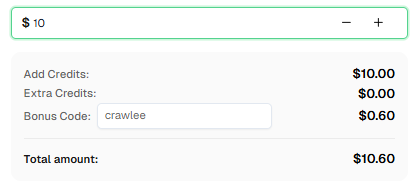
准备好开始了吗? 注册 CapSolver 并使用优惠码 CRAWLEE 在每次充值时获得额外 6% 的奖励!
常见问题
什么是 Crawlee?
Crawlee 是一个为 Node.js 设计的网络抓取和浏览器自动化库,旨在构建可靠的爬虫。它支持基于 HTTP 的抓取(使用 Cheerio/JSDOM)和完整的浏览器自动化(使用 Playwright/Puppeteer),并包含代理轮换、会话管理以及反机器人隐身功能等内置特性。
CapSolver 如何与 Crawlee 集成?
CapSolver 通过封装 CapSolver API 的服务类与 Crawlee 集成。在爬虫的请求处理函数中,您可以检测 CAPTCHA 挑战并使用 CapSolver 解决它,然后将令牌重新注入页面。
CapSolver 可以解决哪些类型的 CAPTCHA?
CapSolver 支持多种 CAPTCHA 类型,包括 reCAPTCHA v2、reCAPTCHA v3、Cloudflare Turnstile、AWS WAF、GeeTest 等。
CapSolver 的费用是多少?
CapSolver 根据解决的 CAPTCHA 类型和数量提供具有竞争力的定价。访问 capsolver.com 查看当前定价详情。使用优惠码 CRAWLEE 在首次充值时获得 6% 的额外奖励。
我可以将 CapSolver 与其他 Node.js 框架一起使用吗?
可以!CapSolver 提供 REST API,可以与任何 Node.js 框架集成,包括 Express、Puppeteer 独立版本、Selenium 等。
Crawlee 是免费的吗?
是的,Crawlee 是开源的,并采用 Apache 2.0 许可证发布。该框架可免费使用,但您可能需要为代理服务和 CAPTCHA 解决服务(如 CapSolver)支付费用。
如何找到 CAPTCHA 网站密钥?
网站密钥通常在页面的 HTML 源代码中找到。查找:
- reCAPTCHA:在
.g-recaptcha元素上的data-sitekey属性 - Turnstile:在
.cf-turnstile元素上的data-sitekey属性 - 或检查网络请求中 API 调用的密钥
我应该使用哪种 Crawlee 爬虫类型?
- CheerioCrawler:最适合快速、简单的 HTML 抓取,无需 JavaScript
- PlaywrightCrawler:最适合 JavaScript 重载的网站和 CAPTCHA 解决(推荐用于 CapSolver 集成)
- PuppeteerCrawler:与 Playwright 类似的替代方案
- JSDOMCrawler:具有基本 JavaScript 支持的中间方案



